|
|
计算器程序
| 程序名称: |
CalcCity |
| 平台: |
fx-9860GII fx-9750GII 其他 |
| 系统/软件要求: |
|
| 版本号: |
v3 |
| 类型: |
游戏 |
| 作者: |
Menne&Shadow15510 |
| 大小(K): |
67 |
| 更新日期: |
2025-11-10 |
| 描述: |
- |
| 已知缺陷: |
- |
| 源代码: |
开源/部分开源 » 其它许可协议(请注明) |
本帖最后由 ilm 于 2025-11-14 22:32 编辑
转自https://www.planet-casio.com/Fr/ ... o-jeux-add-ins.html的评论区7楼
这个原帖并不能直接在g3系列运行,我上传的这个是改过的
readme
CalcCity
Game description
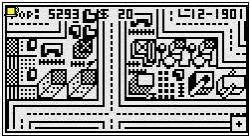
This game is a clone of SimCity classic, at least I tried to make one . When you start the game you will get into the Splash screen, it will disappear after a few seconds. After that you are in the map. Scroll a little around to see how big the map is. Scrolling is done with the arrow keys. The little square box with the “+” in it will move over the screen. When it hits the side the screen will move to the next part of the map.
When you press menu, the menu bar appears. For each function key a menu is added (F3 is still empty). When you press F1, the F1 menu pops up. The mouse changes to a black square and is in the lower left corner of the F1 menu, move it with the arrow keys to select a building tile. When you press EXE you select the tile, the mouse changes to a big opaque square and is on the map again. When you select the right spot for your tile press SHIFT to build.
You cannot build on water, you will first need to make land of it. For that use the shovel and bucket icon, top left of F1 menu. Also, you cannot build on existing structures, you need to demolish first, using the same icon.
You can press function buttons without pressing menu first.
Note that in menu mode (when the menu bar is visible) time stops, the game is paused…
Under F2 there are facility’s like power plants, fire and police stations, health service, schools, water stations, roads, railroads, harbors, airports, waste incinerator, stadium, church.
Roads and railroads are auto placing, meaning that you only have to build a road where you want it, it aligns itself to neighboring roads.
When you build housing type three in a square of four then at some point there will be a skyscraper built. Same for commercial three and industrial. When you build four police stations in a square of four, next month a big police station is built same for fire departments and hospitals.
When there is no, or not enough, water or power the tiles will have blinking icon’s indicating what shortage it has. Also there is an information chart under F5. use it to manage your city. (scroll up and down with the arrow keys)
Under the F4 key you find the fund and Taxes menu. Select items with up and down arrows, adjust with left and right.
Using the F6 key you get in the settings dialogue. Load and save game (only one save game possible, so be careful.) you can exit the game via this menu. Also you can generate a new map, set disasters disabled (or enabled) and set game or time speed using this menu.
When pressing the ”-“ key you get into the mini map, a zoomed out version of CalcCity. Press “+” or menu to get back to normal view.
Key map
- MENU show menu bar
- EXIT hide menu bar
- F1,F2,F4,F5,F6 show menu
- EXE select tile from menu
- SHIFT build tile selected
- SHIFT + -> saves a game
- SHIFT + PLUS loads a game
- SHIFT + EXIT exits game
- OPTN + EXE shows tile information
- SHIFT + 1 shows FPS
- SHIFT + 2 stops all animations
- “-“ shows mini map
- “+” shows normal view
Credits
This game would not have been possible without the help from Vanhoa and Kucalc. Many thanks guys . Without Vanhoa loading and saving games would not be possible, without Kucalc the resetcalc() function and the read second for the FPS counter would not have been possible.
机翻
CalcCity
游戏说明
这款游戏是经典版《模拟城市》的克隆版(至少我尝试做了一个)。启动游戏后,你会进入启动画面,几秒钟后画面会自动消失。之后你将进入地图界面。稍微滚动一下看看地图有多大。滚动是通过方向键实现的。屏幕上会有一个带"+"号的小方框移动。当它碰到边缘时,屏幕会移动到地图的下一个区域。
按下"菜单"键后,菜单栏会出现。每个功能键都对应一个菜单(F3目前仍是空的)。按下F1键,F1菜单会弹出。鼠标会变成一个黑色方块,并位于F1菜单的左下角,使用方向键移动它来选择建筑地块。按下"EXE"键选中地块后,鼠标会变成一个大的不透明方块,并再次回到地图上。当你为地块选好合适的位置后,按下"SHIFT"键进行建造。
你不能在水体上建造,需要先用铲子和水桶图标(位于F1菜单左上角)将其填为陆地。同样,你也不能在已有建筑上直接建造,需要先使用相同的图标进行拆除。
你可以不先按"菜单"键而直接按功能键。
注意,在菜单模式下(当菜单栏可见时),时间会停止,游戏暂停……
在F2菜单下,有各种设施,如发电厂、消防局、警察局、医疗设施、学校、水泵站、道路、铁路、港口、机场、垃圾焚烧厂、体育场、教堂等。
道路和铁路是自动铺设的,这意味着你只需在想建路的地方进行建造,它会自动与相邻的道路对齐。
当你在一个2x2的方格内建造三个住宅区时,最终会建起一座摩天大楼。商业区和工业区同理。当你在一个2x2的方格内建造四个警察局时,下个月会建成一个大型警察局,消防局和医院也是如此。
当某个区域没有或缺乏水电供应时,地块上会有闪烁的图标指示短缺的资源。此外,在F5键下有一个信息图表,可以用它来管理你的城市。(使用方向键上下滚动)
在F4键下,你可以找到资金和税收菜单。使用上下箭头选择项目,使用左右箭头进行调整。
使用F6键可以进入设置对话框。可以加载和保存游戏(只能保存一个游戏存档,请小心操作)。你也可以通过此菜单退出游戏。此外,你还可以生成新地图、设置禁用(或启用)灾难,以及调整游戏或时间速度。
按下"-"键会进入迷你地图,即CalcCity的缩小视图。按下"+"或"菜单"键可返回正常视图。
按键映射
- MENU 键:显示菜单栏
- EXIT 键:隐藏菜单栏
- F1, F2, F4, F5, F6 键:显示相应菜单
- EXE 键:从菜单中选中地块
- SHIFT 键:建造选中的地块
- SHIFT + → 键:保存游戏
- SHIFT + + 键:加载游戏
- SHIFT + EXIT 键:退出游戏
- OPTN + EXE 键:显示地块信息
- SHIFT + 1 键:显示FPS(帧率)
- SHIFT + 2 键:停止所有动画
- "-" 键:显示迷你地图
- "+" 键:显示正常视图
致谢
如果没有Vanhoa和Kucalc的帮助,这款游戏就不可能完成。非常感谢你们。没有Vanhoa,游戏的加载和保存功能就无法实现;没有Kucalc,
"resetcalc()"函数和用于FPS计数器的秒读取功能也无法实现。
原贴提到注意事项:使用 SHIFT 选择内容,而不是 EXE。如果您退出游戏并想再次玩,您首先需要打开不同的加载项(例如 Python),然后返回 MENU,您将能够重新打开 CalcCity。
不知道为什么论坛无法上传emoji内容。。。
|
|




 发表于 2025-11-10 12:18:19

 沉默卡
沉默卡 变色卡
变色卡 千斤顶
千斤顶 显身卡
显身卡